- Uniswap V2
- Uniswap V3
- Uniswap V4
| Library name | Version |
|---|---|
| @uniswap/universal-router-sdk | 2.2.4 |
| @uniswap/sdk-core | 5.3.1 |
| @uniswap/v3-sdk | 3.13.1 |
| @uniswap/v2-sdk | 4.4.1 |
| @uniswap/router-sdk | 1.10.0 |
| @uniswap/permit2-sdk | 1.3.0 |
| ethers | 5.7.2 |
Note: This Processor only swaps within a single pool and does not use an
aggregator to swap across multiple pools. Therefore, you must configure the
pool address for the swap.
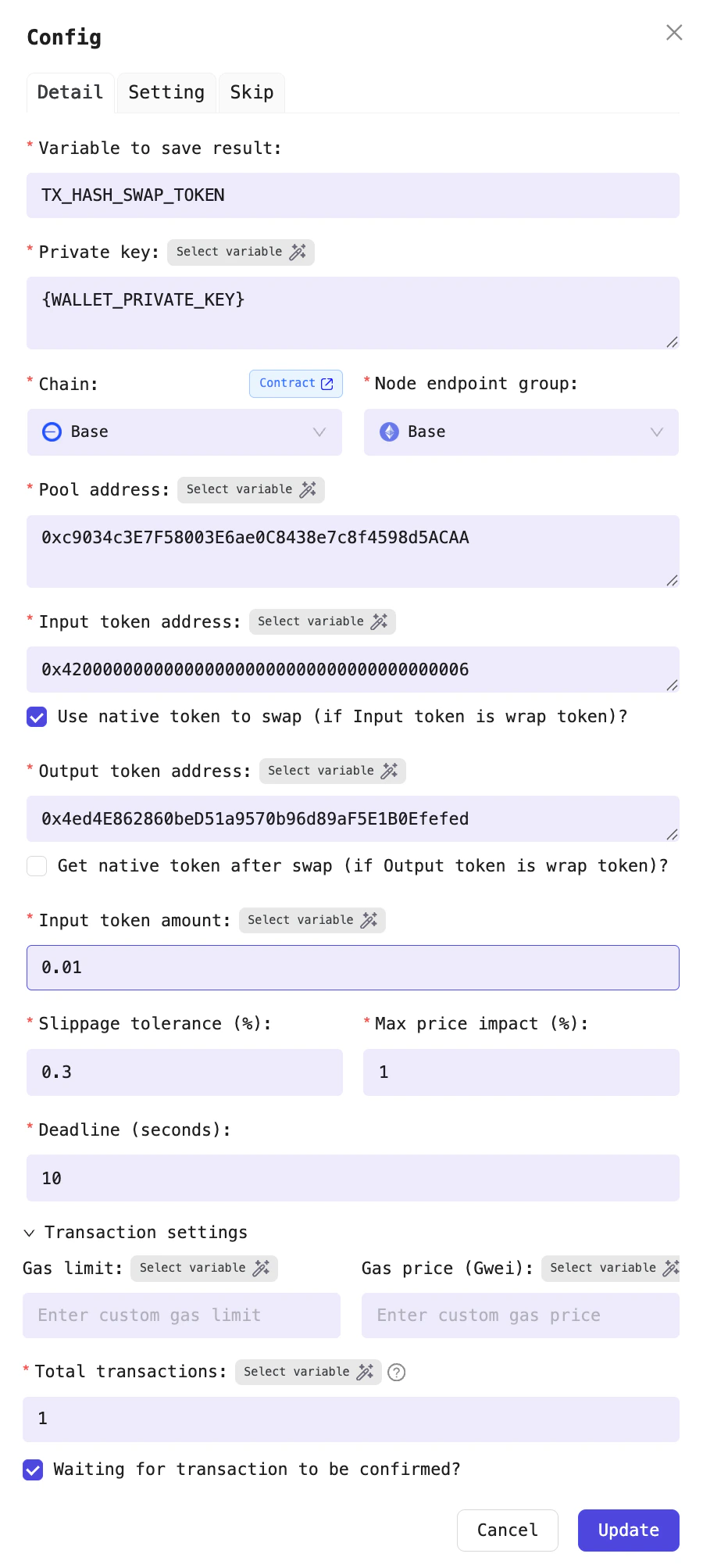
Example: Swap DEGEN tokens to ETH
Configuration fields
| Field name | Required? | Detail |
|---|---|---|
| Variable to save result | Yes | This Processor will output the transaction hash of the swap. You can choose a variable name to store the transaction hash. For example: TX_HASH_SWAP_TOKEN_EVM |
| Private key | Yes | This is the private key of the wallet performing the transaction. Each Profile has a default variable for storing the private key, so you can use the default variable WALLET_PRIVATE_KEY |
| Chain | Yes | The blockchain network where you want to perform the swap |
| Node endpoint group | Yes | Select the node provider to interact with the blockchain |
| Pool address | Yes | The address of the pool you want to swap in |
| Input token address | Yes | A pool contains two tokens; this is the address of the token you want to deposit into the pool to swap for the other token. For example, if you want to swap DEGEN for ETH (sell DEGEN), enter the address of the DEGEN token here |
| Output token address | Yes | The address of the token you want to receive after the swap. For example, if you want to swap DEGEN for WETH (sell DEGEN), enter the address of the WETH token here. If you prefer to receive the native token instead of WETH, you can select Receive native token after swap (if the output token is a wrapped token). This option applies only to pools with wrapped tokens |
| Amount of input token | Yes | he number of tokens you want to sell. For example, if you want to sell 1,000 DEGEN for ETH, enter 1000 |
| Slippage tolerance (%) | Yes | Maximum slippage for swaps. For pools with low price volatility, you should set this value low (e.g., 0.3%, 0.5%). For pools with high price volatility over short periods, set a higher value to increase the likelihood of a successful swap |
| Deadline (second) | Yes | Maximum time allowed to complete the swap transaction. For example, if you enter 10, the transaction will be canceled (reverted) if the swap is not completed within 10 seconds |
| Max price impact (%) | Yes | Maximum price impact for swaps. For pools with high liquidity, you should set this value low (e.g., 0.3%, 0.5%). For pools with low liquidity, you may choose a higher value |
| Gas limit | No | Gas limit for executing the transaction |
| Gas price (Gwei) | No | Gas price for executing the transaction. If you do not specify a value, the gas price will default to the current average on the chain. For best results, it is recommended to set the gas price to increase the likelihood of a successful swap transaction |
| Total number of transaction | Yes | The minimum value is 1. If you enter a value greater than 1, such as 10, this Processor will broadcast 10 swap transactions simultaneously, each with a different nonce, to increase the likelihood that multiple transactions are mined in the same block |
| Wait for the transaction to be confirmed? | No | If you enable this option, the Processor will wait for the swap transaction to be confirmed before proceeding to the next Processor. If you leave it unchecked, the Processor will broadcast the swap transaction without waiting for confirmation and immediately move on to the next Processor |
How to select Gas Limit and Gas Price
If you want to speed up transaction mining by competing on gas, or if the Processor cannot estimate the Gas Limit for certain transactions, you can manually specify the Gas Limit and Gas Price for the Processor. For example, if you want to swap the DEGEN/WETH pool, review several recent transactions to see their Gas Limit and Gas Price. This will help you choose appropriate values for the Processor. Using the following transaction as a reference: https://basescan.org/tx/0x968eb4733010e3ee2501904de8dc987b87233726a917c94a8ba5446cea35d87b, you can set theGas price (Gwei) to 0.2 Gwei and the Gas limit to 176073 for the Processor.
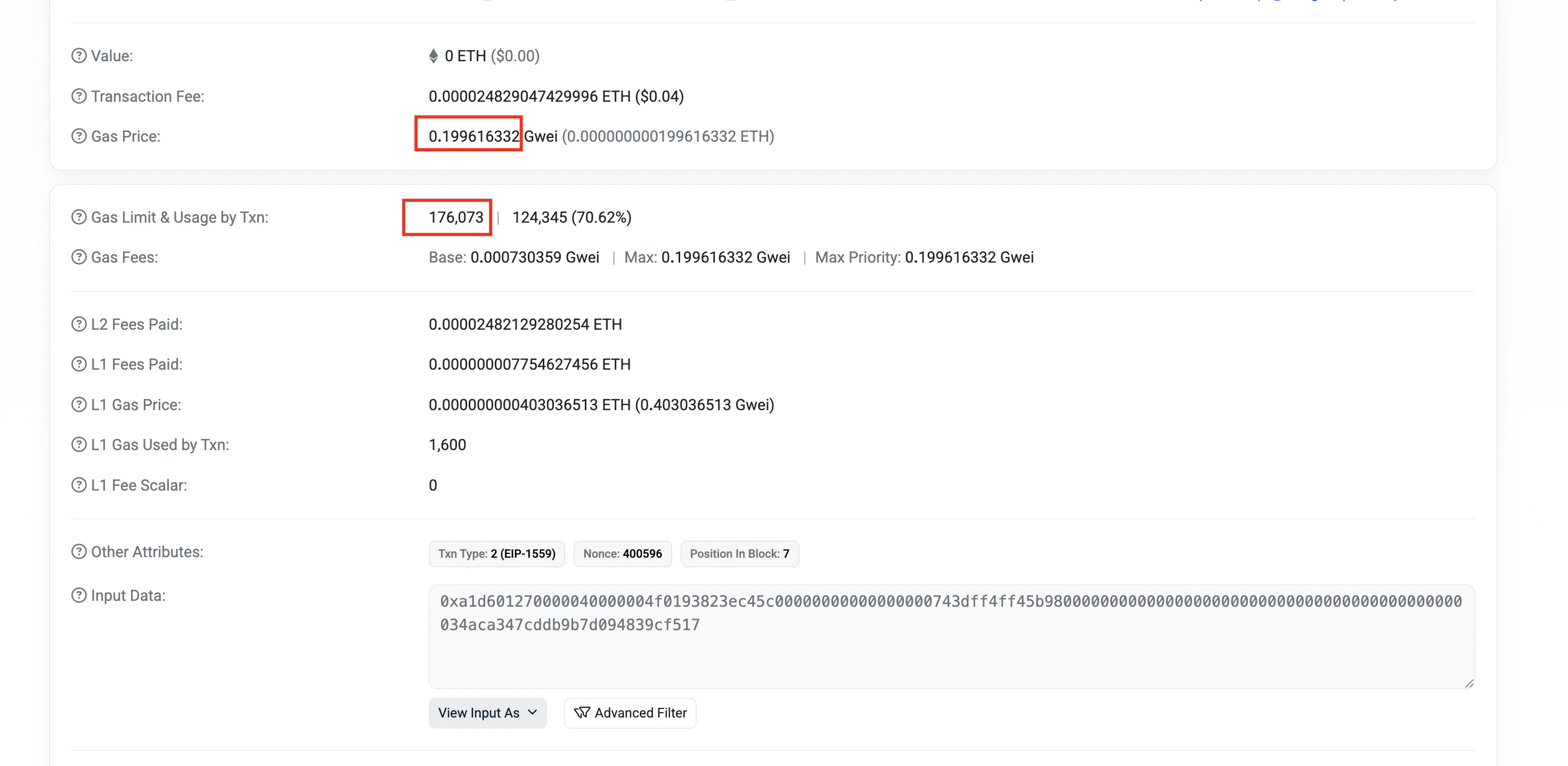
Example of how to choose values for Gas Price (Gwei) and Gas Limit